The Console

Run the whole enclave from one console — by outcomes, not internals.

One role-based console sits over the entire appliance: identity, admission, patching, backup, monitoring and compliance. Ask or command it in plain language and it answers in outcomes — "cameras encrypted · 2 certs expiring" — never AD, Kerberos or a CLI. The technician who installs the cameras stands the whole thing up with a Setup Wizard: two or three questions and one button.
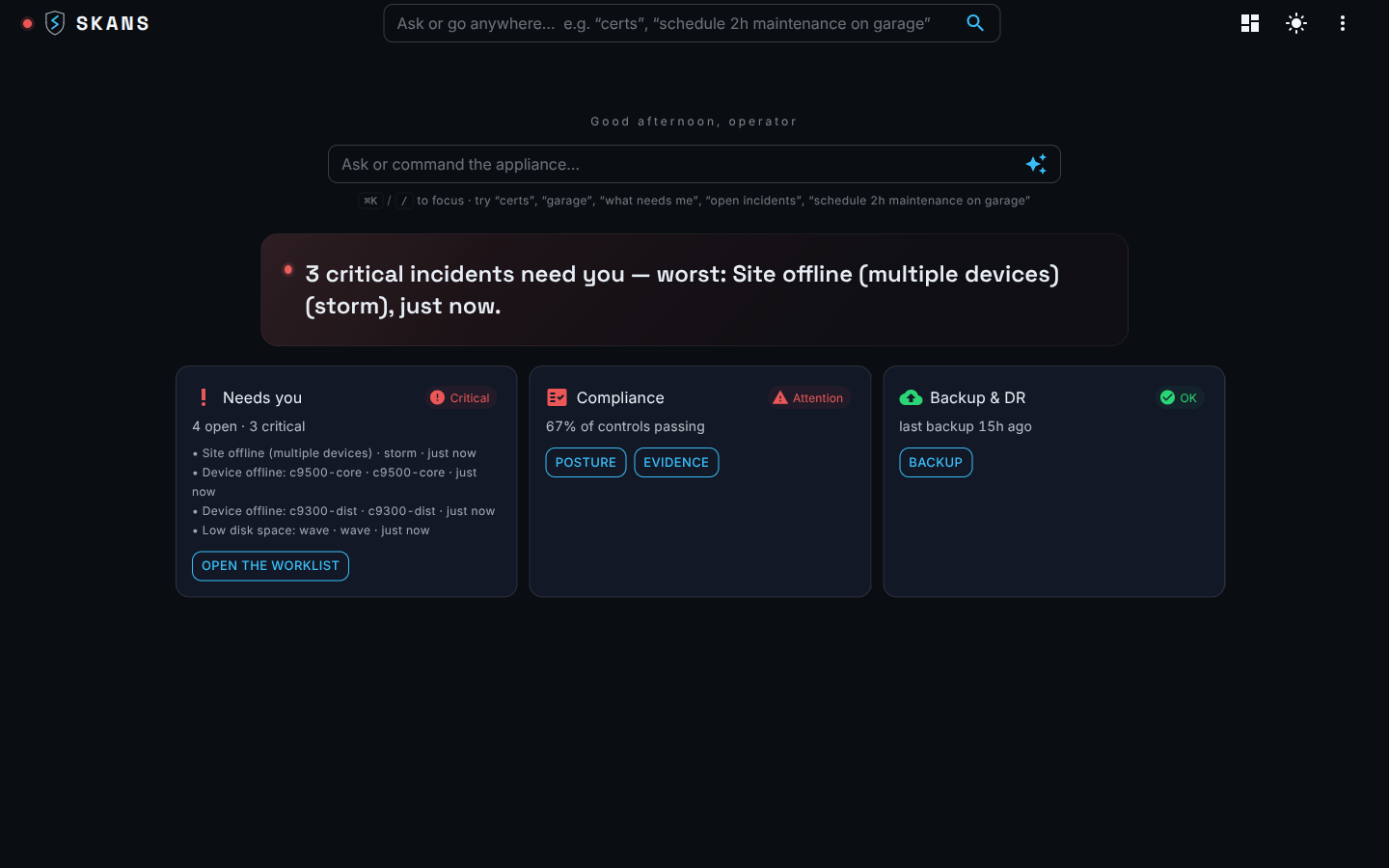
Skans console · Home
The Skans console home — an ask-or-command bar over a correlated triage worklist of what needs you, plus compliance and backup status.

The command bar

Ask or command the appliance.

There's no left-hand menu. Every page, device, CVE and control is a destination you reach by typing — and the same bar resolves any identifier to the entity that holds it. Ask "certs", "what needs me", or paste a MAC, and the appliance answers in plain language.
  • Type anything — hostname, IP, MAC, serial, certificate thumbprint, CVE, KB or user — and the bar lands you on the entity that holds it.
  • Live against the database — resolution runs on the control-plane store with no separate index to drift, cancelled and re-run on every keystroke.
  • Honest about time — a match is labelled current, last-seen, or historical; yesterday's MAC still gets you to today's device.
  • Works air-gapped — CVE and free-text search fuse keyword and on-box semantic retrieval, so it runs on a disconnected site with no cloud call.
  • Capability-filtered — a destination your role can't use never appears, and the target page re-checks authorization on arrival.
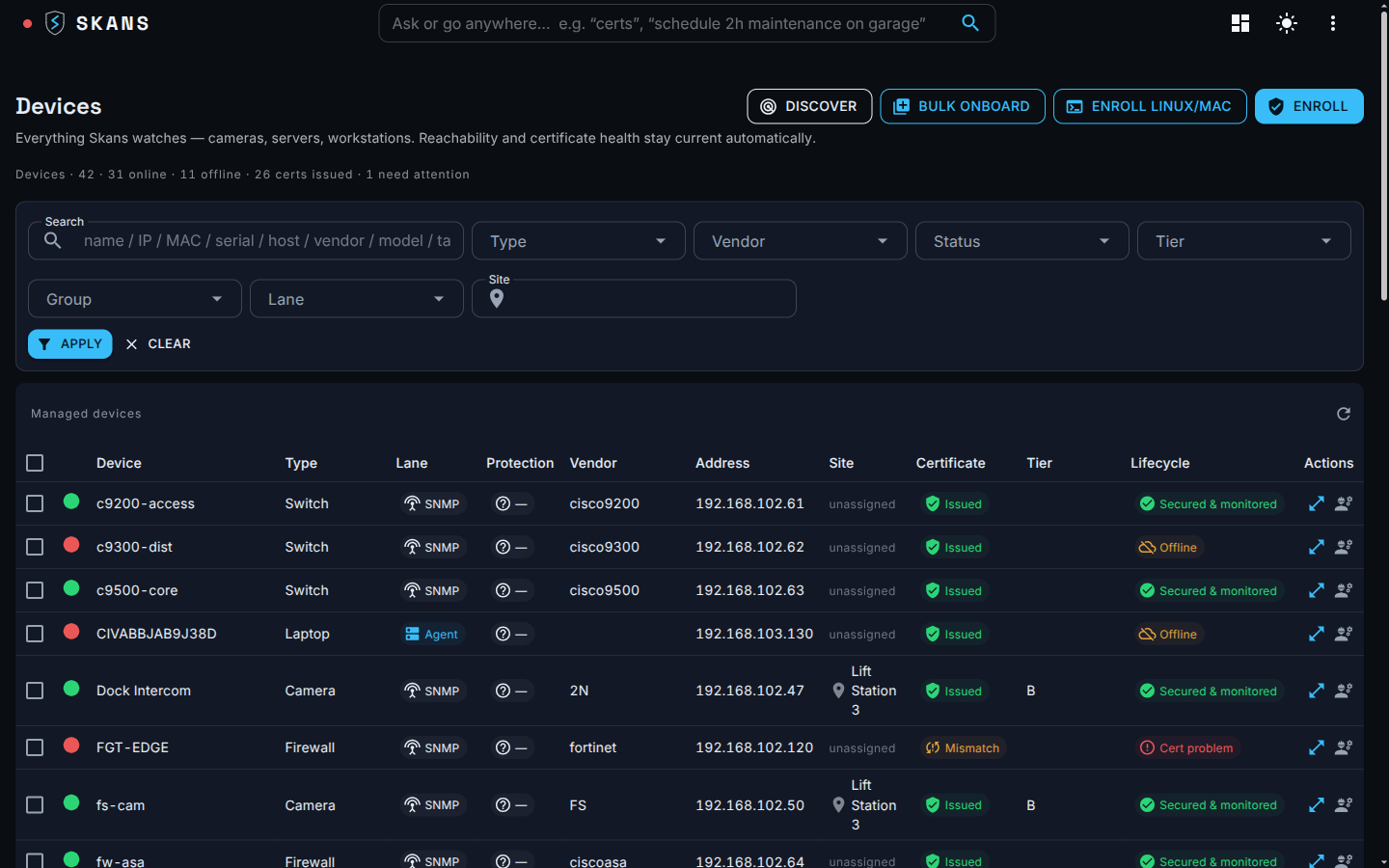
Skans console · Devices
The Skans console device inventory — every camera, switch and firewall with its certificate status, capability tier and onboarding lane.

Role-based by design

Six roles. One console. Least privilege.

The same console resolves to six lenses — Admin, Technician, Manager, Supervisor, Operator, Auditor — each scoped to what that person should see and do. Access is expressed as capability claims, not a fixed role enum, so a role is exactly the bundle of actions the job needs and nothing more.
  • 18 fine-grained capabilities — from dashboard.view to device.deploy to the break-glass dr.restore — bundle into six least-privilege roles.
  • Layered enforcement by design — the nav, the individual controls, and a server-side re-check, on the rule that a hidden button is not a control.
  • Attributed to the real person — every action is stamped with the signed-in principal, and the audit trail is tamper-evident: hash-linked and signed, not a rewritable log.
  • The Auditor's lens — read-only NIST posture and evidence, review and attest, export a signed pack; no mutating action.
  • Break-glass held tight — destructive in-place restore of SQL, CA or AD is an Admin-only grant that sits above every other capability.
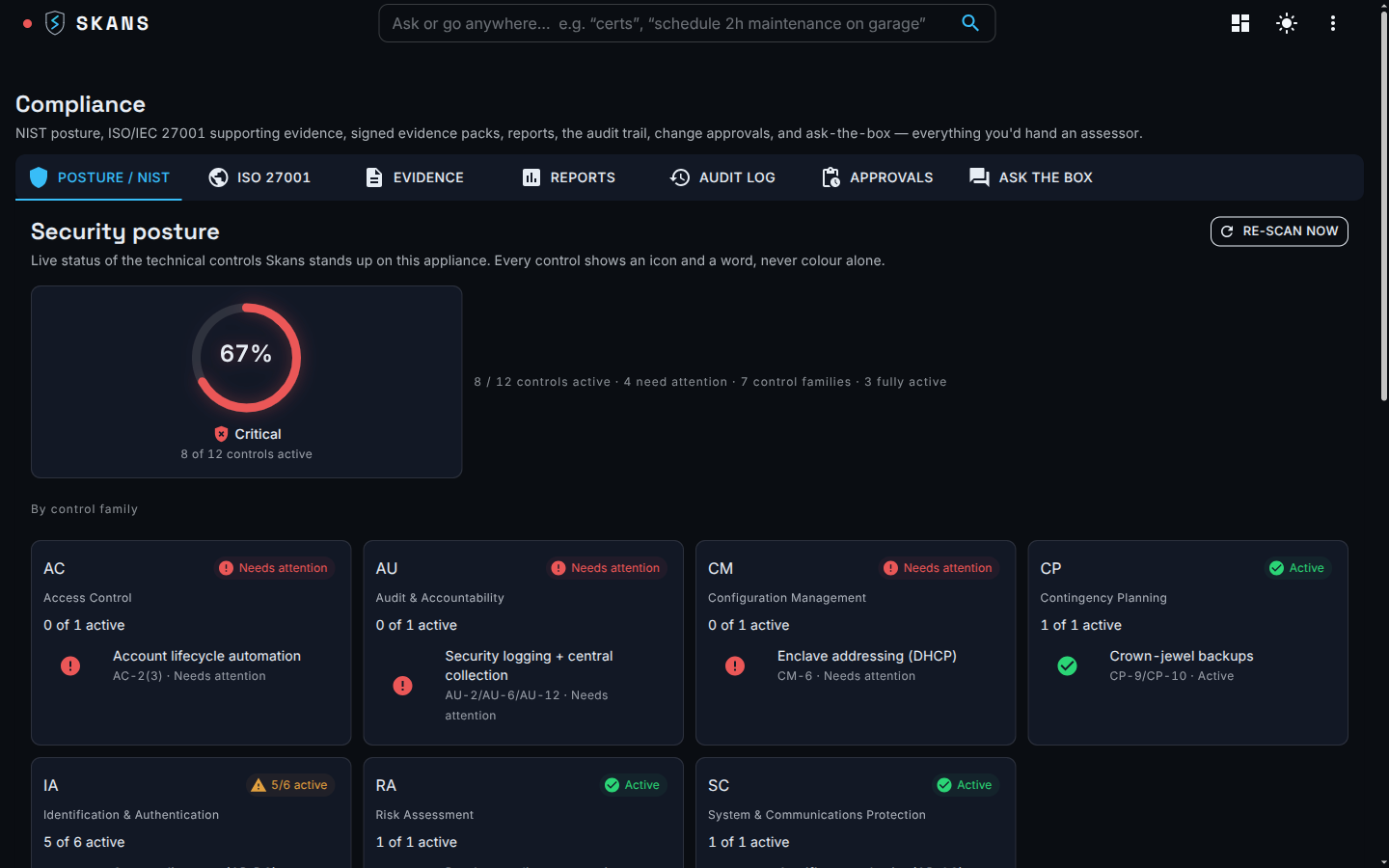
Skans console · Compliance
The Skans compliance view — a NIST security-posture ring and per-control-family cards, the Auditor's read-only lens on the same console.

What the console guarantees

Built for the operator. Hardened for the auditor.

Outcomes, never internals

The operator reads results — "cameras encrypted · 2 certs expiring" — never AD, Kerberos, a CA chain or a CLI. Expert tooling exists, but it's never the technician's path.

Air-gapped by default

The console is served on-box over HTTPS to a browser, and its embedded analytics stay on loopback. Nothing about your enclave leaves the wire.

Hardware-backed login

Sign in with a smart-card / PIV certificate from your own CA — phishing-resistant MFA for administrators, proven on Windows, with a driver-free FIDO2 lane coming.

Session controls an auditor asks for

Login rate-limited to five attempts a minute per IP, a 15-minute idle lock, and every login audited with its source IP — supporting NIST AC-7 / AC-11 / AC-12.

Stood up on site

Set up by the tech who installs the cameras.

The console's front door is a Setup Wizard, not a runbook. Two or three plain questions — site name, an admin password, confirm the network — and one button stands up the directory, certificate authority, network admission, device drivers and hardening behind it, from golden-config defaults.

  • Two or three questions, one button — no PowerShell, no PKI or AD jargon, ever.
  • Idempotent and resumable — safe to re-run; it detects prior state, resumes across the reboots it needs, and self-heals if you close the browser mid-build.
  • Plain-language errors — "Couldn't reach Camera 3 — check the cable, then Retry," never a stack trace.
  • Proven, not assumed — each green tick is verified on the wire (the device actually serves its issued cert), then you run the site by the Home worklist.
Skans console · Home
The Skans console home — the outcomes worklist the operator runs the site by once the Setup Wizard finishes.

At a glance

The whole enclave on one wall.

For an always-on operator station, the NOC view is a wall of live tiles — the fleet's health in one look. It reads a materialized store, so a page opens instantly instead of live-querying every device on the wire.
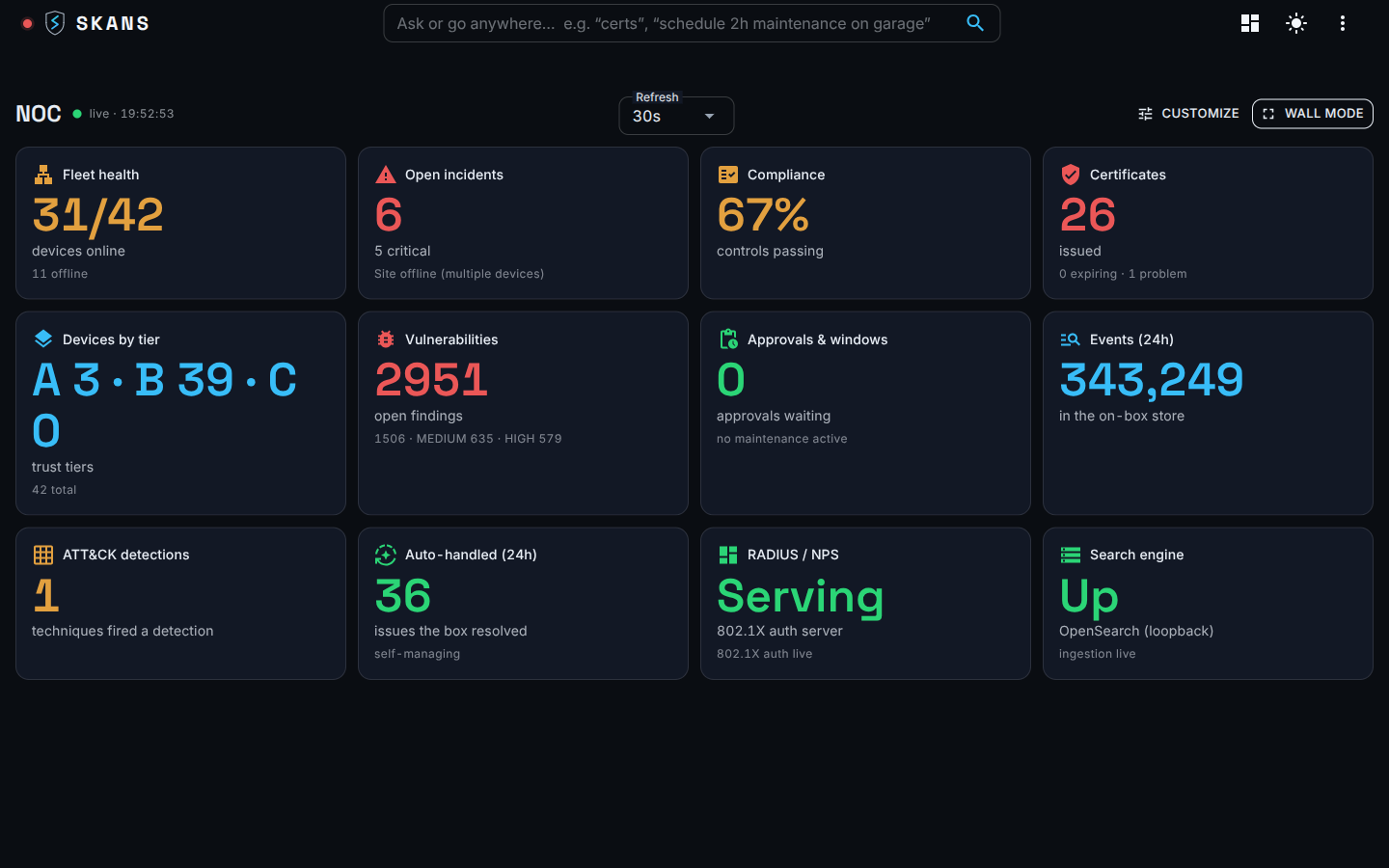
  • The tiles that matter — fleet health, open incidents, compliance %, expiring certificates, devices by tier, vulnerabilities, ATT&CK detections, and RADIUS / 802.1X status.
  • Correlated, not raw — findings are bounded by device count, so the numbers stay legible as the fleet grows, never a firehose of events.
  • Embedded analytics, same RBAC — dashboards ride a deny-by-default proxy that passes each role only the views it may see.
  • Degrades gracefully — a dead analytics service shows a retry card, never a broken frame, and never takes Home down with it.
Skans console · NOC
The Skans NOC wall — live metric tiles for fleet health, incidents, compliance, certificates, vulnerabilities and 802.1X status.

Talk to us

See Skans on your network.

Built for the teams running networks the cloud can't reach. Email us for a technical walkthrough — architecture, controls, and exactly how it stays offline.