Credential vault

Every login sealed to the box. Every reveal on the record.

Device logins, saved passwords and secure notes belong in one encrypted place — not a spreadsheet or a config file. Skans seals every secret with a key that never leaves the appliance — a non-exportable TPM key on the Windows appliance — uses it internally without ever putting it on screen, and records every reveal and copy in the audit log. You own the keys; nothing leaves the wire.

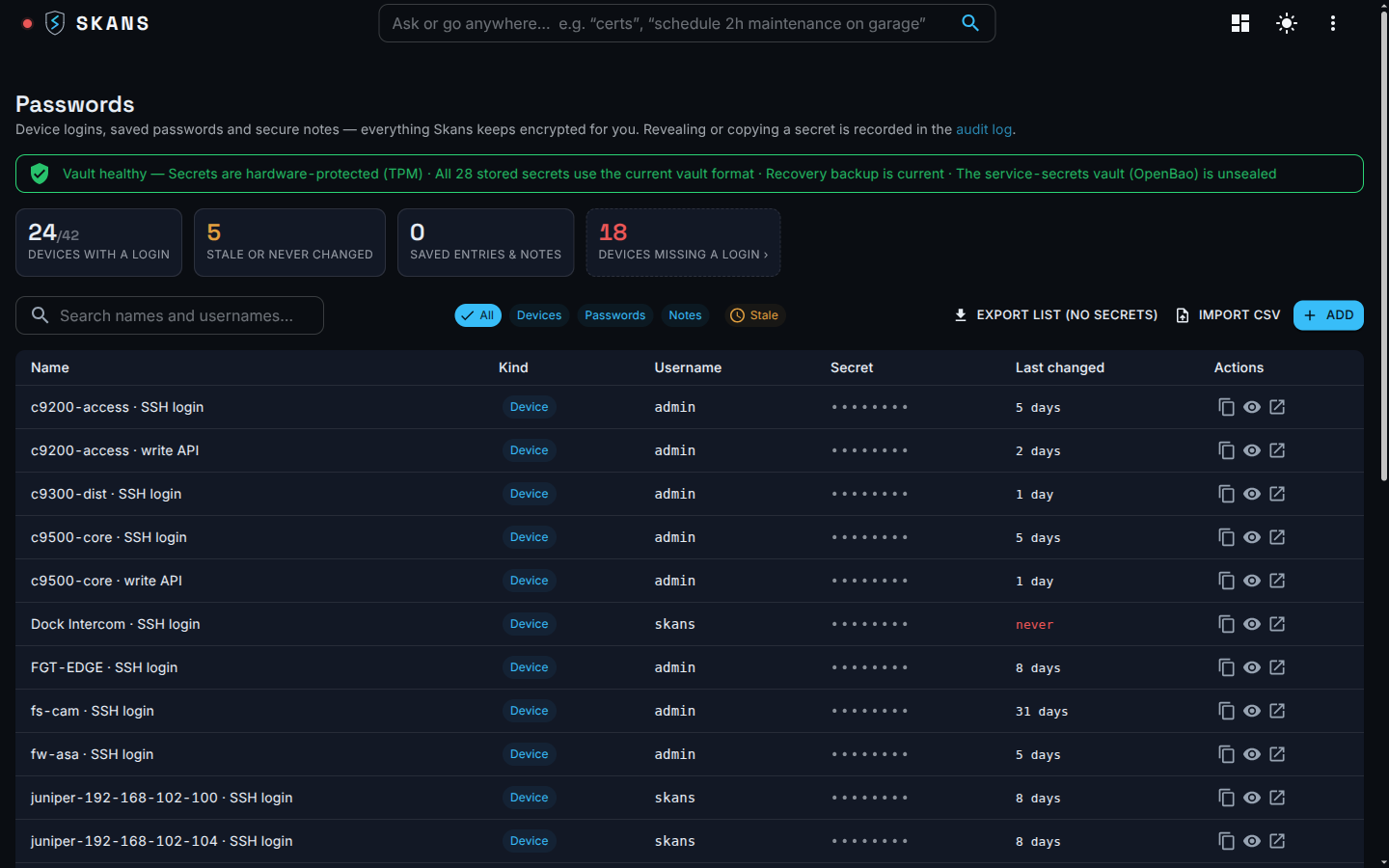
Skans console · Passwords
The Skans credential vault — the Passwords page listing device logins, saved passwords and secure notes, each encrypted at rest and TPM-sealed on Windows, with audited reveal and copy.

One place, entered once

One vault for every secret you'd otherwise write down.

Every device and service credential Skans holds lives in one encrypted place — plus the saved passwords and secure notes your team would otherwise scatter across spreadsheets. You enter each one once through the console; it's encrypted on the way in and never written to a plaintext file.

  • Device logins — the management credential Skans uses to reach a camera, switch or controller, issue and bind its certificate, and read its health.
  • Controller & API keys — a service or controller credential, like the read-only login for a network controller.
  • Saved passwords & secure notes — the wifi PSK, the rack combination, the break-glass account your team keeps on a sticky note — with the note body encrypted right alongside the secret.
  • Entered once, zero-exposure — the value is written straight into the SQL vault as an SKV2 envelope, never echoed back on entry, and never staged to a config file, script or JSON.
Skans console · Passwords
The Passwords page with device credentials, saved passwords and secure notes listed as masked entries.

How it's protected

Sealed to the hardware inside the box.

A key that never leaves the box

On Windows the wrapping key that seals the vault is a non-exportable TPM key — RSA-2048 in the platform crypto provider, sealed to this appliance and working even on a vTPM. That's the hardware-backed root.

A fresh key per secret

Envelope encryption: every credential gets its own AES-256-GCM data key, wrapped by a key-encryption key, sealed by the TPM. No two secrets ever share a key.

Bound to where it belongs

Each ciphertext is tied to its exact device and field with authenticated data. Lift a blob onto another device or column and it simply fails to decrypt — a copied secret can't be replayed where it doesn't belong.

Honest about the fallbacks

No usable TPM? Skans falls back to DPAPI or a permission-locked keyfile — and says so; only the TPM path is reported as hardware-backed. The appliance runs FIPS approved-mode, which it never dresses up as CMVP validation.

Nothing revealed off the record

Every reveal and copy lands in the audit log.

Skans uses a stored credential internally without ever putting it on screen. Surfacing one again is a separate, deliberate action — and it never happens silently.

  • Gated by capability — revealing or copying a stored credential needs the vault.reveal capability: a small, auditable grant, not blanket admin.
  • Copy-first, then re-mask — the console copies without showing where it can, and re-masks a revealed password after 30 seconds. The control is the record, not withholding the secret from the field tech whose job needs it.
  • On the audit trail — every interactive reveal, credential set or rotation is recorded to the SQL audit trail as a vault-decrypt by the acting operator.
  • Down to the machine reads — background and machine decrypts append to a dedicated skans-vaultaudit index with who, when, scope, field, KEK id, provider and host. Recorded and queryable now.
Skans console · Passwords
A vault entry with copy-first and reveal controls, each action recorded to the audit trail.

Coverage, not guesswork

See which devices have no login — or a stale one.

A vault is only as good as its coverage. The Passwords page rolls up the whole fleet — which devices have a stored login, which are missing one, and which haven't been changed in too long — all from a projection that never decrypts a thing.
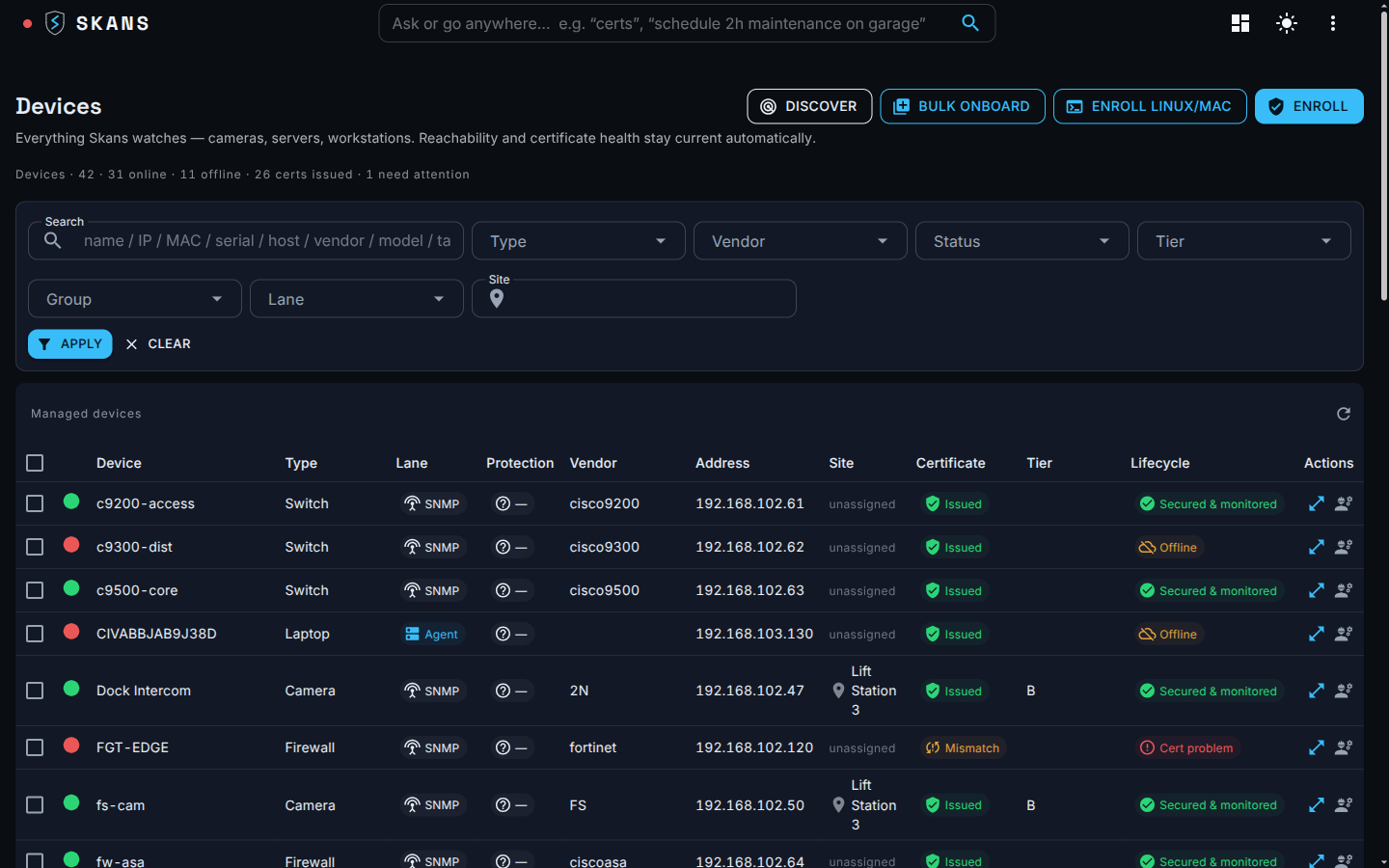
  • Coverage at a glance — fleet tiles count how many managed devices actually have a credential on file, computed without opening a single secret.
  • A missing-login list — the devices Skans manages but holds no credential for, so a gap can't quietly persist.
  • A staleness filter — surface the credentials that haven't been rotated in too long, so an ageing password can't hide in a long list.
  • Import what you already have — bring existing secrets in from KeePass or CSV with a masked preview, then delete the source file on the way out.
Skans console · Devices
The device inventory with cameras, switches and firewalls, showing which managed devices carry a stored credential.

Resilient by design

The vault outlives the box — and stays apart from the machine's own secrets.

Your credentials are protected in ways that outlast the appliance they live on, and kept apart from the machine secrets the box runs on itself.
  • Rotate online, safely — key rotation and re-wrap run on a live appliance: new key material is minted before the old is retired, every write is crash-safe, and nothing goes down.
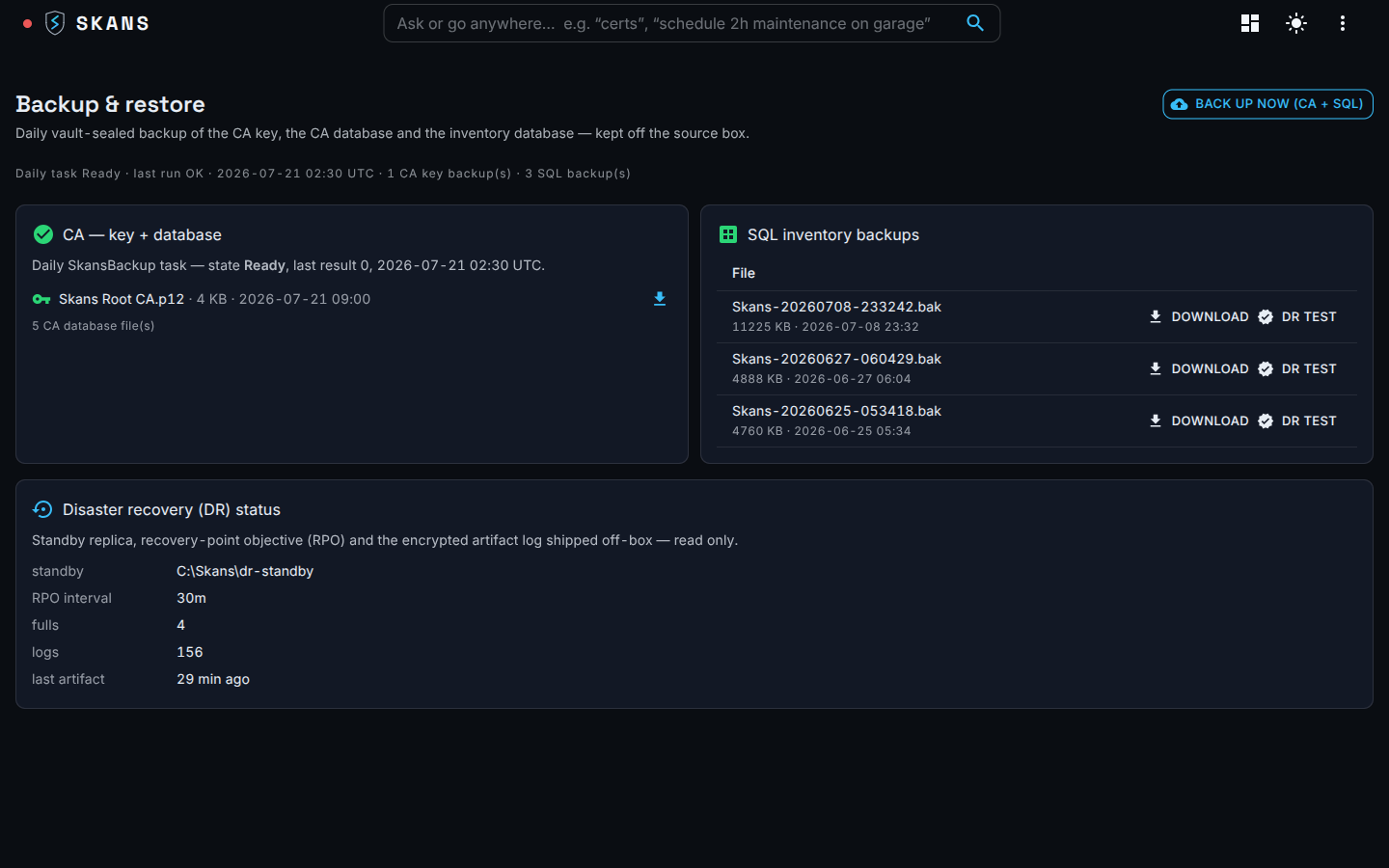
  • Backed up encrypted, off the source — where off-box backup is enabled, a vault snapshot travels with the daily set, encrypted before it leaves and held on a different machine than the one it protects; the key that decrypts that set is escrowed off the appliance so a standby or rebuilt box can open it.
  • Recoverable without the vault — a critical secret like the CA-backup password is escrowed so a rebuilt box recovers it even before the vault is back. Full escrow of the live vault key itself — to a PIV token or recovery secret, so a rebuilt box unseals the running vault directly — is on the roadmap.
  • A separate store for machine secrets — the appliance's own service secrets — the RADIUS secret, smartcard management keys, the SCEP minter — live in a distinct sealed store that auto-unseals only to the service and is never browsed by hand. Defense in depth, not one basket.
Skans console · Backup & DR
The backup and disaster-recovery view showing off-box encrypted backup sets and restore-verified status.

Talk to us

See Skans on your network.

Built for the teams running networks the cloud can't reach. Email us for a technical walkthrough — architecture, controls, and exactly how it stays offline.