Skans Sanitizer · Windows app

Send the support dump. Keep the customer out of it.

Skans Sanitizer is a Windows desktop app for the technician who has to hand a vendor a log bundle, a config export or a database backup — and cannot hand over the customer with it. Drop the files on it and it builds a transformed copy: deterministic rules and open-weights language models, both running on the laptop, replace hostnames, addresses, accounts, names, secrets and site words consistently; an independent residual check re-reads the copy before anything can leave; the mapping sheet stays with you. Nothing is uploaded and nothing is fetched. The copy is written beside the original.

Skans Sanitizer · Source
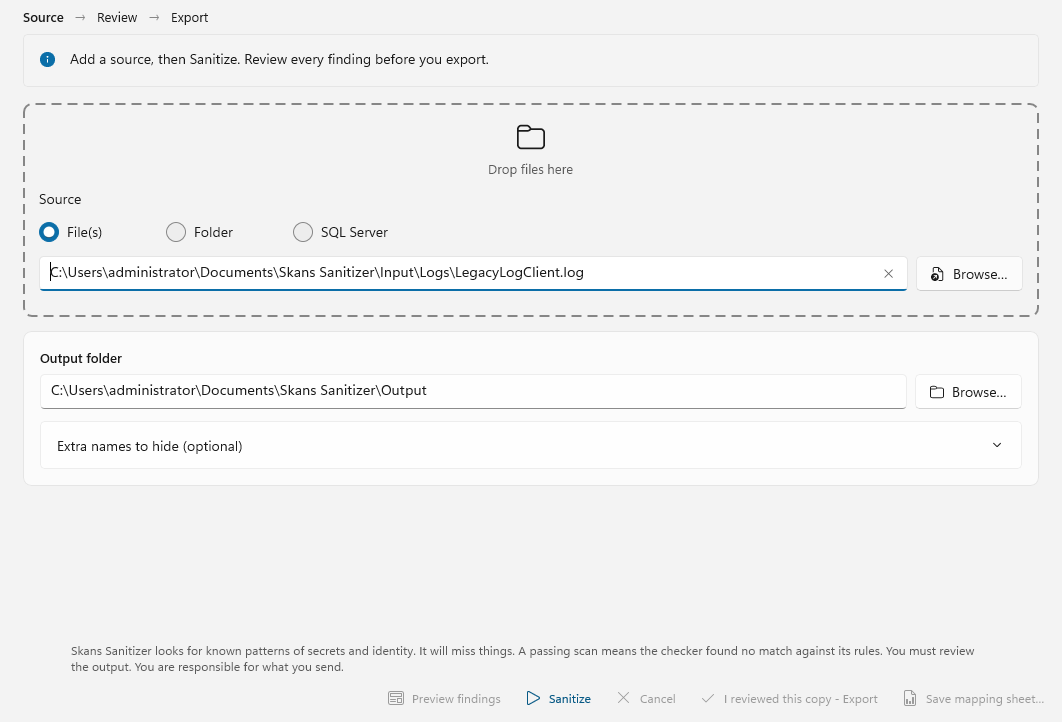
The Skans Sanitizer window before a job — the Source step with a log file chosen, the output folder beside it, a box for extra names to hide, and the line that says the app looks for known patterns and that the person who sends the copy is responsible for it.

How it works

One window. Drop, sanitize, review, export.

There is no wizard. The technician drops a zip, a folder, loose files or a SQL Server backup on the window, presses Sanitize and reviews what was found. The visible sanitized copy exists only after the residual scan passes and the review is acknowledged — the work happens in a quarantined job directory the technician cannot pick up off disk and send by mistake.

  • Reads everything a support bundle contains — text and log files, JSON, XML, CSV, nested archives, and SQL Server .bak backups restored through a local SQL Server instance.
  • The source is never touchedbundle.zip becomes bundle.sanitized.zip, rebuilt entry by entry, never a mutated copy of the original.
  • Pre-flight before the job — what was dropped, what no parser recognises, whether a SQL Server instance is available, and a place to add site names, tag prefixes and project words no rule would catch.
  • Same replacements next week — keep the job's vault and the next dump from the same site gets the same pseudonyms, so a vendor case can span several uploads.
  • Scriptable — the same pipeline runs headless from the command line for scheduled or bulk use.
Skans Sanitizer · Source
The Skans Sanitizer source screen with a dropped log file listed in the pre-flight, the custom-terms box, and the Sanitize button.

What it looks for

Identity, addresses, secrets, and the words only your site uses.

Deterministic rules, context rules and structured-field rules run first and catch everything that has a shape. A local language model reads what does not — names in prose, a contact in a ticket note — and its findings are ranked with the rules; a lower-confidence guess never overrides a certain match. Replacements are consistent across the whole job, so a hostname is the same pseudonym in every file it appears in.

Network identity

IPv4 and IPv6 addresses, MAC addresses, hostnames and FQDNs, Windows and LDAP distinguished names, GUIDs, version strings and device serial numbers — including the keyed forms found in config exports (host=, server:, tags in a column).

People and accounts

Domain and local accounts, e-mail addresses, person names, phone numbers, postal addresses, national identifiers and account numbers, in prose and in structured fields.

Secrets

Private keys, JWTs, API keys and tokens, connection strings, encoded secrets and password fields. Secrets are always removed; the policy panel lets you pseudonymise or preserve every other kind, but never a secret.

Your own vocabulary

Company names, device tags and their misspellings, and custom terms you add before the job — site codes, project names, tag prefixes — plus a signed rules pack that updates without a new build.

Rules and a model, both on your machine

Two ways of seeing. Nothing leaves the laptop.

Patterns catch what has a shape: an address, a MAC, a key, a hostname. They cannot read. So alongside the deterministic rules the app runs open-weights language models locally, on Windows ML, with no API and no network: the same detection a cloud service would sell you, without sending the customer's dump anywhere to get it. The rules and the model are ranked together; a model guess never overrides a certain match, and a second model pass re-reads the finished copy before export as an independent check.

Names and identity in prose

OpenAI's open-weights privacy-filter model (Apache 2.0) reads log lines and ticket notes the way a person would, and finds the site contact, the engineer who signed off, the cardholder in a SQL insert, where no regex could.

Database columns by meaning

MongoDB's leaf-ir embedding model with a sqlite-vec index inside the job's own store classifies a column called Data1 as a person-name column because its values are, whatever the header says. Schema, types and relationships are kept.

A second observer before export

The residual checker has its own rules and its own model pass at a lower threshold. A person name the transform missed blocks the export; it is never quietly shipped because the first pass did not see it.

Offline by design

The install bundle carries the app, the .NET and Windows App SDK runtimes, both models and the vector extension. Nothing is fetched at install and nothing is uploaded at run time. Every job report says which detection ran: rules only, or rules and model, with the model version.

Readable, not random

Pseudonyms a support engineer can talk about.

Replacements are ordinary words, one per domain label, used everywhere that label appears: dc1.northwind.local reads back as amber.harbor.local and NORTHWIND\a.torres as harbor\quilt. The vendor can say “the harbor domain” on the call and mean the right thing. The mapping sheet — CSV or XLSX, the real values against the pseudonyms — is written for the technician only; the app refuses to write it inside the sanitized copy.

  • Counts, never values — the job report beside the copy records what was found and why anything was blocked, and never contains an original or a replacement value. Neither do the app's logs.
  • A second, independent scan — after the transform, a separate checker with its own rules, at a lower threshold, looks for anything that survived. Anything it cannot account for blocks the export.
  • Blocked means blocked — a failed or incomplete scan, a value the transform could not carry through, or an unacknowledged review all stop the export. The app does not show a clean result it cannot stand behind.
  • Nothing is uploaded — the only network call the app makes is its licence check-in to Skans Labs, which carries the licence key, a machine fingerprint and export counters. Never your files.

What it is not

It assists. It does not certify.

Skans Sanitizer is an assistive tool. It looks for known patterns of secrets and identity; it will miss values and mis-classify values. A passing scan means the checker found no match against its current rules. It is not a legal status, and the person who sends the output is responsible for what they disclose. The app says exactly that on the review screen, every time, and the export button sits under it. The full Disclaimer of Warranty and Limitation of Liability ships in the app and forms part of the software agreement accepted on first launch.

Editions & pricing

Free to try on files. Paid by the seat, or by the person.

Every edition runs the full engine — the same detection, transform and residual scan. What you pay for is unlimited export, folder and database sources, the mapping sheet, more seats, and someone to call. A seat is one Windows machine; a licence key is issued and activated from the customer portal, and the portal shows how many seats an account holds.

Community — free

One seat, five sanitized copies every 30 days, files only, no mapping sheet. A free key is issued to a verified account on the portal and checks in every 30 days. No card.

Trial — 14 days, full

Everything a paid seat does — unlimited export, folders, SQL Server backups, the mapping sheet — for 14 days on one machine. When it ends the app keeps working as Community.

Seat packs — by card

Per seat per year: $999 for one, $899 each in a pack of five, $799 each in a pack of twenty-five. Annual, prepaid, in USD, managed from the portal.

Enterprise agreement

Licences per person rather than per machine, held in a pool at your organisation, with a view of who holds what and the ability to release a leaver’s seat without a ticket. Negotiated and invoiced. Talk to us.

Talk to us

See Skans on your network.

Built for the teams running networks the cloud can't reach. Email us for a technical walkthrough — architecture, controls, and exactly how it stays offline.